Your own garden
Design your own garden, on your real plot
Most garden design programs start you on a blank sheet, or on an aerial photo you have to trace yourself. SUPGARDEN starts at your address: your plot boundary and your house are on it right away, to scale. From there you simply draw what you want, and the plants carry their real mature size.
7 days free · no card needed · then €30 per month excl. VAT, or you stop
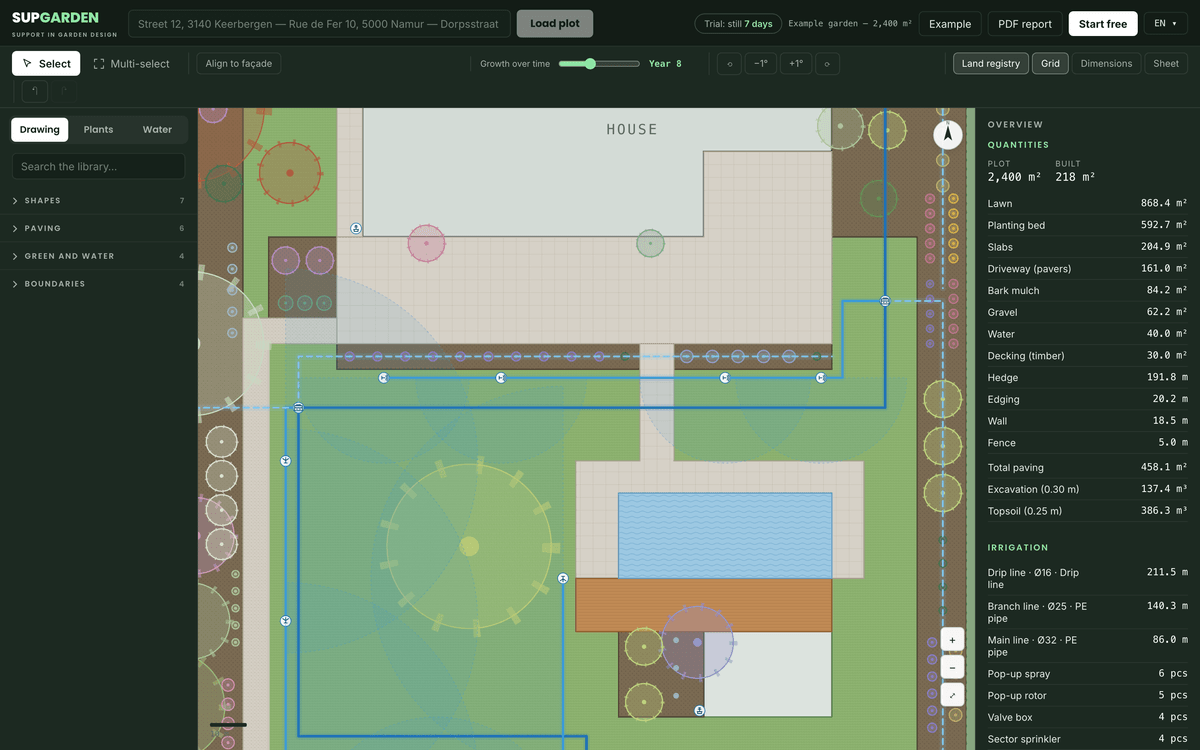
What changes when you start from your own address
How it often goes today
- A drawing program that starts on a blank sheet, or an aerial photo you trace yourself.
- Guessing how much space a plant will take in five years.
- Going to the garden centre with a list in your head.
- A plan you do not dare hand to a contractor, because there are no dimensions on it.
With SUPGARDEN
- Entering your address is enough: your plot and your house are to scale.
- Every plant carries its mature size; one slider shows year 1, 5 or 10.
- The plant list counts per species how many you need.
- A plan with real dimensions and m², that you can hand to a contractor.
How to go about it
-
1. Enter your address
Plot boundary and house appear to scale. You do not need to measure anything to start.
-
2. Lay out the big surfaces
Terrace, driveway, lawn and borders. Pick a material and the m² appears by itself — handy to know how many pavers or rolls of turf you need.
-
3. Choose the planting
Search by name, check sun or shade, flowering time and mature width, and click the plant onto the plan.
-
4. Look ahead in time
Set the slider to year 5 or year 10. Is everything still apart, or does your border close up? You correct that now, not with the spade.
-
5. Take your list
The plant list counts per species how many you need. Print the document and take it to the nursery or the garden centre.
What you get, from the example garden
Every image on this site is a real view from the app, of the example garden you open with one click in the app: a villa on a plot of 40 by 60 metres, with driveway, south terrace, pool, borders, orchard, vegetable garden and irrigation.


Open the example garden yourself in the app, no account needed
What it costs, against what the wrong plant costs
A tree too close to the hedge, a border that closes up in year five, plants you buy a second time: in SUPGARDEN you see that beforehand, on your own plot and at real size. SUPGARDEN costs €30 per month excl. VAT, and you stop when your plan is done. If you have it built, you simply hand the plan and the list to the contractor.
And you risk nothing
- 7 days free, with everything included: enough to make your first plan.
- No card needed to start.
- Then €30 per month excl. VAT, cancel monthly — or you simply stop.
- Your gardens stay in your account; even after the trial you can keep viewing them.
Frequently asked questions
Do I need to be able to draw?
No. You click points and the lines go straight and square by themselves. Anyone who can point at a rectangle can draw a terrace.
Does it work at my address?
Reading your plot automatically works for addresses across Belgium and the Netherlands. In Brussels only the plot comes in and you draw your house yourself. If you live elsewhere, you draw your plot on the grid yourself — that works anywhere, you just have to measure.
Is it also usable for a balcony or a small city garden?
Yes. You can draw to within 25 cm and zoom in far.
Can I save my plan?
Yes. Your gardens are in your account, and you open them on any device where you log in. Even after the trial you can keep viewing them.
How many plants does the program know?
The library holds the species most often planted in our regions — trees, hedging plants, shrubs, perennials, grasses, climbers and ground covers — with their real sizes and properties. It grows steadily.
Start at your own house
Type your address and see what is there.
7 days free · no card needed · then €30 per month excl. VAT, or you stop
Email us: info@supgarden.be